


If you're based in India and finding that the BC.Game website isn't responding, you aren't alone. Many players encounter sudden hurdles, such as pages failing to load, payment errors, or an inability to sign into their accounts.
This guide breaks down the specific network and payment challenges common in India and provides step-by-step fixes. We'll cover everything from using a VPN and clearing your browser data to trying a different device or reaching out to the support team as a last resort.
- Why You Might Be Unable to Access BC.Game in IndiaCommon Reasons BC.Game Is Inaccessible in India
- Games Not Loading or Freezing
- BC.Game App Not Working
- Quick Fixes to Regain Access
- Fixing Issues with Your Browser and DeviceBrowser and Device Troubleshooting
- Login and Account Access Problems
- Payment Failures and Deposit Errors
- When to Contact BC.Game Support
- Prevent Future Access Problems
Why You Might Be Unable to Access BC.Game in India
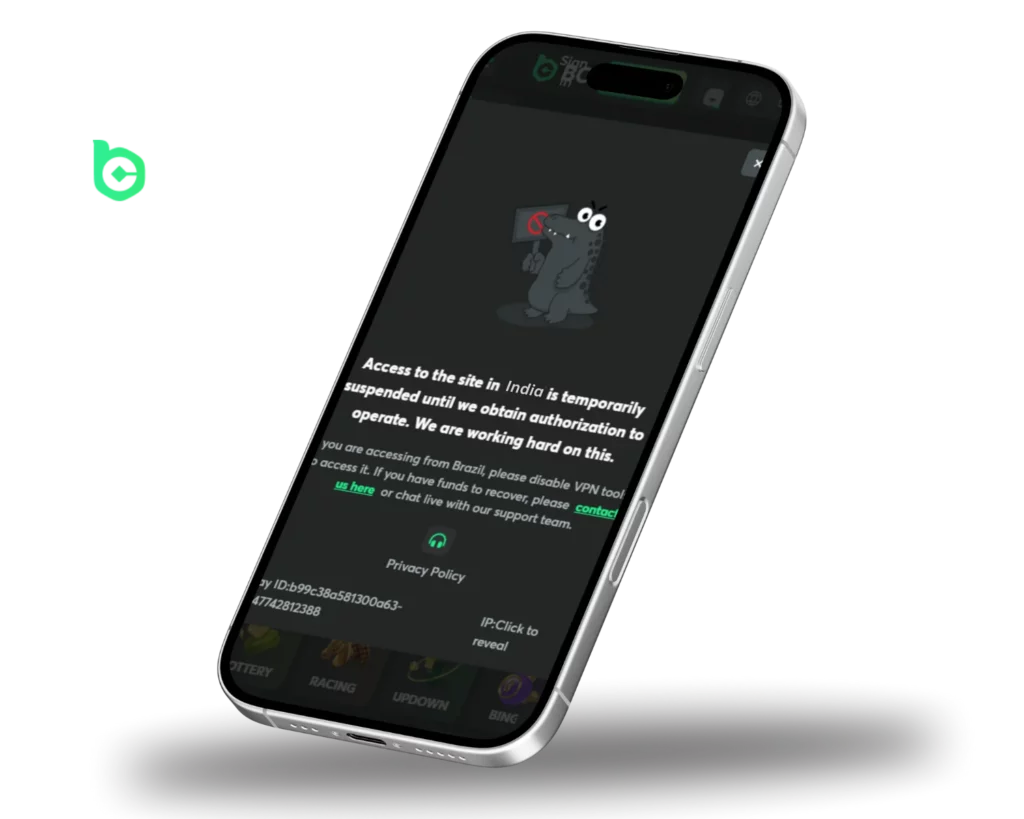
When BC.Game stops working in India, the culprit is often the way your hardware or software communicates with the site. Pinpointing the exact cause is the fastest way to find the right solution.
Regional Access Restrictions
In India, access to certain crypto-casinos and gaming sites can be sporadic due to local regulations or restrictions imposed by telecom providers. While there is no blanket nationwide ban on BC.Game, some states or regions may apply stricter filters, especially for platforms involving real-money wagering.
If the site refuses to load entirely or kicks you to an error page, it's a strong indicator that your connection is being filtered.
ISP-Level Blocking
Your Internet Service Provider (ISP) essentially acts as a gatekeeper. Some providers maintain blacklists of domains related to cryptocurrency and betting, which can block your access. In such cases, you might encounter:
- A connection timeout
- An 'Access Denied' or '403 Forbidden' message
- A blank screen that doesn’t respond
These blocks don't resolve themselves. If you find that the site works perfectly on mobile data but not on your home Wi-Fi, your ISP is almost certainly the one blocking the connection.
DNS Issues
Sometimes the issue is deeper—within your device's DNS settings. The DNS is like a phonebook that turns a URL like bc.game into a machine-readable IP address. If your ISP's default DNS is outdated or restricted, it may fail to direct you to the site correctly.
You may experience:
- Websites that start to load but crash or hang halfway
- Specific sections, like the deposit or login pages, failing to open
- Constant lagging or frequent disconnections
Switching to a reliable public DNS, such as Cloudflare (1.1.1.1) or Google (8.8.8.8), often bypasses these hurdles immediately.
Games Not Loading or Freezing
If you're experiencing freezes or loading loops while playing, the cause is usually tied to your connection stability, software version, or the game provider's own servers. Identifying the root cause will save you time and frustration.BC.Game games are not loading or freezing, the issue could be related to internet stability, software compatibility, or game provider availability. Understanding the cause can help restore gameplay without unnecessary delays.
Possible Reasons
- Unstable Internet – A weak signal or fluctuating bandwidth often leads to lag and buffering.Slow Internet Connection – A weak or unstable network can cause lag, buffering, or failure to load games.
- Outdated Software – Using an old browser version can cause compatibility issues, particularly with high-end live dealer games.Outdated Browser or Software – Older browsers or operating systems may not support certain game features, especially live dealer games.
- Server Maintenance – Occasional downtime or technical glitches on the provider's end can make specific games temporarily unavailable.Server-Side Issues – Some games may be temporarily unavailable due to maintenance or technical problems on the provider’s end.
- Script Blockers – High security settings or certain browser extensions can accidentally disable the scripts the casino needs to run.Blocked Scripts – Security settings or browser extensions may disable scripts required for casino games to function properly.
Fixes
✔ Refresh the Page – A simple reload often clears temporary glitches. ✔ Turn Off Ad Blockers – Some extensions interfere with game code; try disabling them for this site. ✔ Stick to Google Chrome – BC.Game is optimized for Chromium browsers, ensuring a smoother experience. ✔ Keep Everything Updated – Ensure both your browser and OS are on the latest version. ✔ Check for Maintenance – If only one specific game is acting up, it's likely being updated by the provider.Refresh the Page – Reloading the game page can resolve minor loading issues.
✔ Disable Ad Blockers – Some browser extensions may interfere with game scripts, preventing them from running correctly.
✔ Use Google Chrome – The platform is optimized for Chromium-based browsers, improving game performance.
✔ Update Your Browser and Device Software – Running the latest versions helps avoid compatibility issues.
✔ Check if the Game is Under Maintenance – If only one game is affected, it may be temporarily unavailable due to updates or provider issues.
If none of these quick fixes work, try switching to a different device or contacting the BC.Game support team to investigate further.
BC.Game App Not Working
If the BC.Game app is crashing or won't open, it's usually due to an outdated version, a buggy installation, or a device that doesn't meet the minimum requirements. Solving these will get the app running smoothly again.BC.Game app is not working, the issue may be caused by outdated software, installation errors, or device compatibility problems. Identifying the cause can help restore functionality and prevent further issues.
Possible Reasons
- Outdated App Version – Old versions can lead to crashes or missing features.App Needs an Update – Running an outdated version may cause performance issues, crashes, or missing features.
- Corrupted Files – If the installation process was interrupted, some files might be missing or damaged.Corrupt Installation Files – If the app did not install properly or files are damaged, it may not function correctly.
- Hardware Compatibility – Older smartphones may struggle to handle the app's technical demands.Device Compatibility Issues – Some older or unsupported devices may struggle to run the BC.Game app efficiently.
Fixes
✔ Update the App – Grab the latest version from the official website or app store. ✔ Perform a Clean Reinstall – Delete the app and install it again to wipe out any corrupt data. ✔ Check App Permissions – Make sure the app has the necessary access to your network and storage. ✔ Clear Storage Space – A nearly full phone can slow down or crash the app.Update the App – Check the app store or BC.Game’s official website for the latest version.
✔ Reinstall the App – Uninstall and reinstall the app to remove any corrupted files.
✔ Allow Permissions – Ensure the app has access to necessary functions such as storage and network settings.
✔ Check Device Storage – If your device has low storage, free up space to improve app performance.
If you're wondering why BC.Game isn't working, the reason could be anything from server downtime and login errors to regional blocks or payment delays. Most of these are easy to fix by updating your software, clearing your cache, or using a VPN. If your funds are stuck, double-check your KYC status and wagering requirements.
For persistent technical problems, feel free to reach out to the BC.Game support team at [email protected]. Knowing these common pitfalls ensures your gaming remains uninterrupted.[email protected]. Understanding common issues and their solutions can help ensure a smooth gaming experience without unnecessary interruptions.
Quick Fixes to Regain Access
Don't assume a block is permanent if the site isn't loading. Most connectivity issues can be resolved in just a few minutes with the right steps.
Use a Reliable VPN
Using a VPN (Virtual Private Network) in India allows you to hide your actual IP address and route your traffic through a server in another country. This is the most efficient way to circumvent regional blocks and regain access to BC.Game.
To use BC.Game in India:
- Choose a reputable, paid VPN service (avoid free ones, as they often compromise your privacy).
- Connect to a server in a country where the platform is fully accessible, such as Canada, Singapore, or the Netherlands.
- Open your browser and reload BC.Game.
If the site loads perfectly via VPN, you've confirmed that your local network or ISP is the source of the block.
Try Official Mirror Links
To help players in restricted areas, BC.Game often provides 'mirrors'—alternate web addresses that lead to the exact same platform. Your account, bonuses, and balance remain identical regardless of which link you use.
How to find them:
- Follow BC.Game’s official channels on Twitter or Telegram for updated links.
- Reach out to live support to get the most current mirror URL.
- Save the working mirror in your bookmarks for easy access later.
Mirror sites are a standard industry solution to ensure users can bypass ISP-level blocks and maintain a steady connection.
Switch DNS Servers
Since your DNS server handles how you connect to the web, swapping your ISP's default settings for a public DNS can often bypass the filters blocking BC.Game.
Here’s how to do it:
| Google DNS: | Cloudflare DNS: |
| Primary: 8.8.8.8 | Primary: 1.1.1.1 |
| Secondary: 8.8.4.4 | Secondary: 1.0.0.1 |
You can adjust these settings in your device's network or Wi-Fi configuration. Once changed, restart your browser to apply the new settings.
Fixing Issues with Your Browser and Device

Sometimes the problem isn't the network—it's the browser. Old cached data or minor software bugs can prevent the site from functioning as intended.
Clear Cache and Cookies
Browsers store cookies and cache to load pages faster, but when this data becomes outdated, it can conflict with the current version of the website.
What you might see:
- Broken layouts
- Login errors
- Buttons not responding
How to fix it:
- Open your browser settings.
- Go to your browser's History or Privacy settings.Privacy or History section.
- Select Clear browsing data.
- Select the option to clear 'Cookies and Cached Images/Files' and confirm.Cookies and cached files, then confirm.
Reload the site after clearing. You'll likely need to sign in again, but the performance should be significantly better.
Switch Browsers or Devices
Different browsers handle scripts differently. If Chrome is giving you trouble, give Firefox, Brave, or Edge a try. Sometimes a different browser avoids the specific conflict or ad-block issue you're facing.
It's also useful to switch between a laptop and a phone. If the site works on your mobile data but not on your PC, the problem is tied to your home internet or computer settings.
Login and Account Access Problems
If the homepage loads but you can't get past the login screen, the issue is likely related to your account details or a glitch with two-factor authentication (2FA).
Check Login Credentials
Typing errors are the most common culprit. Carefully re-enter your email and password, paying close attention to:
- Caps Lock being turned on
- Accidental spaces, which often happen when copying and pasting.
- Language settings (e.g., accidentally typing in Hindi instead of English).
If you're still stuck, use the 'Forgot Password?' feature to securely reset your credentials via email.“Forgot Password?” link on the login screen. Follow the email instructions to reset your password safely.
2FA Not Working
If your 2FA codes are being rejected, it's usually a time-synchronization problem. Since authenticator apps rely on precise timing, even a few seconds of difference between your phone and the server can cause a failure.
To fix it:
- Set your phone's date and time to 'Automatic.'
- Refresh your code in Google Authenticator or Authy.
- Generate a new code and try again.
If you're still locked out, contact support; you may need to verify your identity to have 2FA reset.
Payment Failures and Deposit Errors
Payment glitches can be stressful, but they are usually caused by regional banking restrictions, incomplete verification, or a misunderstanding of the rules.
UPI, PhonePe, PayTM Not Working
Many users in India rely on UPI apps like PayTM or PhonePe. However, some banks or payment processors may flag or block transactions to gaming sites.
If a deposit doesn’t go through:
- Check your account balance first
- Try a different UPI app (if available)
- Wait a few minutes before retrying
For a more seamless experience, try using cryptocurrency. BC.Game supports over 90 coins, including USDT, Bitcoin, and Ethereum, which generally bypass traditional banking blocks and process almost instantly.
Confirm Wagering Requirements
If you can deposit but can't withdraw, check if you've met the 1x wagering requirement. BC.Game requires you to play through your deposit amount at least once before you can cash out.1x wagering. BC.Game requires players to wager the full amount of any deposit at least once before allowing withdrawals.
For instance, a ₹1,000 deposit requires ₹1,000 in total bets. This is a standard security measure used to prevent money laundering and fraud.
Keep in mind that winnings earned through bonuses often come with their own wagering requirements. You'll need to meet these specific conditions before those funds can be cashed out.
When to Contact BC.Game Support
If none of the troubleshooting steps mentioned above worked and BC.Game is still acting up, it's time to contact the support team. Certain issues—particularly those involving account locks, KYC verification, or frozen transactions—simply require a staff member to fix them manually.
You should contact support if:
- The recommended solutions didn't fix the problem
- Your account has been suspended, banned, or flagged for security reasons
- You've gone through the verification process, but you're still unable to log in
- A transaction for a deposit or withdrawal is taking significantly longer than expected
- You're unable to reset your two-factor authentication (2FA) settings independently
Support Options
You can get help from BC.Game through several different avenues:
- 24/7 Live Chat: This is your quickest bet for a fast answer. Just click the chat bubble on the website.Live Chat (24/7): Best for fast replies. Click the chat icon on the site.
- Email: Send a message to [email protected] if you have a complex issue or need to submit a formal request.Email: [email protected] for formal requests or detailed problems.
- Community Support: Head over to the official Telegram or Discord channels to chat with other players, find current mirror links, or get guidance from moderators.Community Help: Join official Discord or Telegram channels to ask questions, find mirror links, or speak to moderators.
To speed things up, have your account email and username on hand before you message support. It allows the agent to find your account and resolve the issue much faster.
Prevent Future Access Problems
After you've successfully gotten back into your BC.Game account, it's a good idea to set a few things up to prevent this from happening again. A little preparation now means fewer headaches later.
- Save Official Mirror Links: Whenever the platform provides an alternative URL, bookmark it right away. Keep these links in a secure note or a password manager so you don't have to search for them every time the main site is down.Bookmark Official Mirror URLs
When BC.Game provides alternate links, save them immediately. Store them in a password manager or note-taking app so you’re not stuck hunting them down later. - Keep Your VPN Current: Like any software, VPNs need regular updates to fix bugs and bypass new blocks. Stick with a reputable, high-speed provider that doesn't keep logs of your activity.Keep Your VPN App Updated
VPNs need updates just like any other app. Keep yours current to avoid connection bugs and blocked servers. Choose a provider with fast speeds and no logs. - Set Up 2FA and Notifications: Secure your funds by turning on two-factor authentication. It's also wise to enable email alerts for new logins; that way, you'll know immediately if someone tries to access your account unauthorized.Enable 2FA and Email Alerts
Protect your account by activating two-factor authentication. Also, enable email alerts for logins or suspicious activity. This adds an extra layer of security and can help you react faster if something goes wrong. - Stick to Reliable Crypto Wallets: For the most seamless experience with deposits and withdrawals, use established options like Trust Wallet, MetaMask, or a physical hardware wallet. This minimizes the chance of transaction errors or bank interference.Use a Trusted Crypto Wallet
For smoother deposits and withdrawals, stick to well-known wallets like MetaMask, Trust Wallet, or hardware wallets. These reduce the risk of failed transactions or blocked payments from banks.
Spending a few minutes on these precautions now can save you a lot of frustration in the future.
FAQ: BC.Game Access in India
Is BC.Game banned in India?
There isn't a formal, country-wide ban. However, some local internet service providers (ISPs) might block the site using their own filters. No, there’s no official nationwide ban. However, some internet providers may restrict access to the site based on local filters.
Is it safe to use a VPN for BC.Game?
Yes, it is safe, provided you use a reputable VPN. Be cautious with free services, as they often track your data or offer unstable connections. Yes, as long as you’re using a trusted VPN. Avoid free VPNs—they may log your activity or expose your connection.
Why am I seeing an “Access Denied” message?
This is typically a sign that your internet provider has restricted access to the domain. You can usually bypass this by using a VPN or switching to an official mirror site. This usually indicates that your ISP has blocked the site. Using a VPN or an official mirror link can help you regain access.
What's the best alternative for depositing if UPI isn't working?
Switching to cryptocurrency is your best bet. BC.Game supports a huge variety of coins, including Bitcoin, TRON, and USDT, and the transfers are almost instantaneous. Crypto is the most reliable method. BC.Game accepts a wide range including USDT, Bitcoin, and TRON, with near-instant processing.
How can I get the latest mirror link?
Keep an eye on the official BC.Game Twitter or Telegram channels for the latest updates. You can also ask a live chat agent for a working link. Check BC.Game’s official Telegram or Twitter accounts. You can also reach out via live chat for updated links.